
How to Look Up Your Case on Missouri CaseNet Online in Just 5 Minutes
If you have a case in a Missouri court, you need to know your court date and case status. If you miss a hearing, the court can issue a warrant or a judgment against you. That’s why it’s important to check your Missouri court records on time.
Want to search your case now?
MoCaseLookup.com is an independent informational website and is not affiliated with Missouri Judiciary.
Quick Answer 🏛️
To look up a case on Missouri CaseNet, go to courts.mo.gov/casenet and pick a search option. You can search by name, case number, filing date, or court date. It is free, and you don’t need an account.
- Don’t know the case number: Litigant Name Search
- Have the case number: Case Number Search
- Need your court date: Scheduled Hearing Search
- Checking a judgment: Judgment Index
Today, you don’t need to visit the Circuit Clerk’s Office for this. Missouri CaseNet (also called Case.net) lets you do a free Missouri court case lookup and search public court records from home in just five minutes. You can search by name, case number, filing date, or court date, and you don’t need an account.
Below is the complete step-by-step guide.
Disclaimer: This website is an independent informational resource and is not affiliated with Missouri Courts, the Missouri Judiciary, or the Office of State Courts Administrator (OSCA). This guide was prepared by Jawad Ahmed, a Legal Research Contributor with a B.A. in Political Science, for general informational purposes only. For accurate and up-to-date court case information, always refer to the official Missouri CaseNet website.
Step 1: Open the Official Missouri CaseNet Website
Open any web browser like Chrome or Safari and search for “Casenet MO” or “MO Casenet”
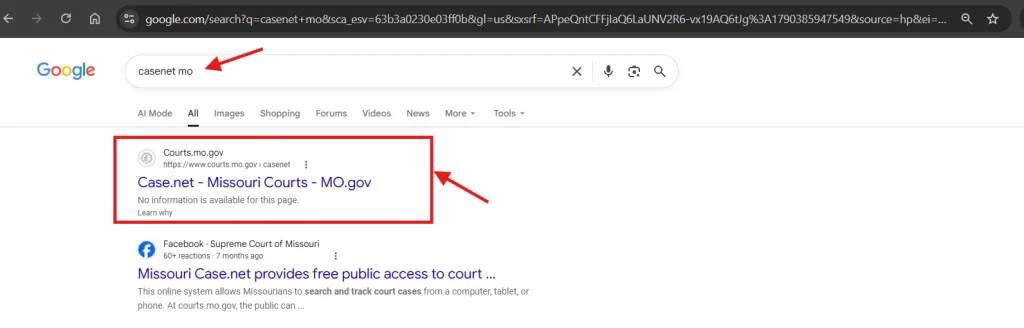
The official Missouri Courts CaseNet portal “courts.mo.gov/casenet” will appear at the top.
Open the website. The system will take you to the Case.net homepage. If you are having trouble opening the CaseNet website, read this guide.
Step 2: Choose Your Search Option
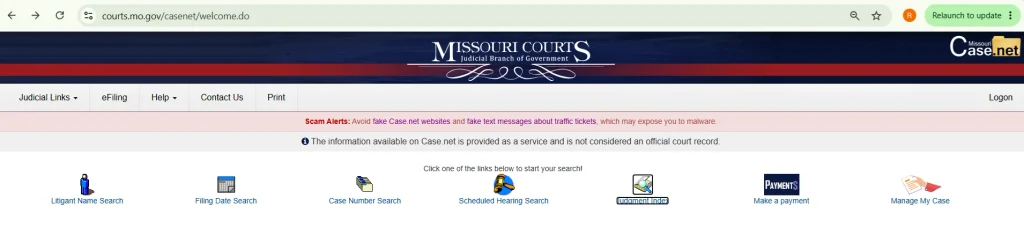
On the homepage, you will see multiple search options, such as:
- Litigant Name Search
- Filing Date Search
- Case Number Search
- Scheduled Hearing Search
- Judgment Index
- Make a Payment
- Manage My Case
You don’t need an account to search Casenet. Just pick the option that matches the details you have.
Case.net is available Monday through Friday, from 6 a.m. to 1 a.m. (Central Time).
Method 1: Casenet MO Name Search (Litigant Name Search)
If you only know the name of the person or business, click “Litigant Name Search“.
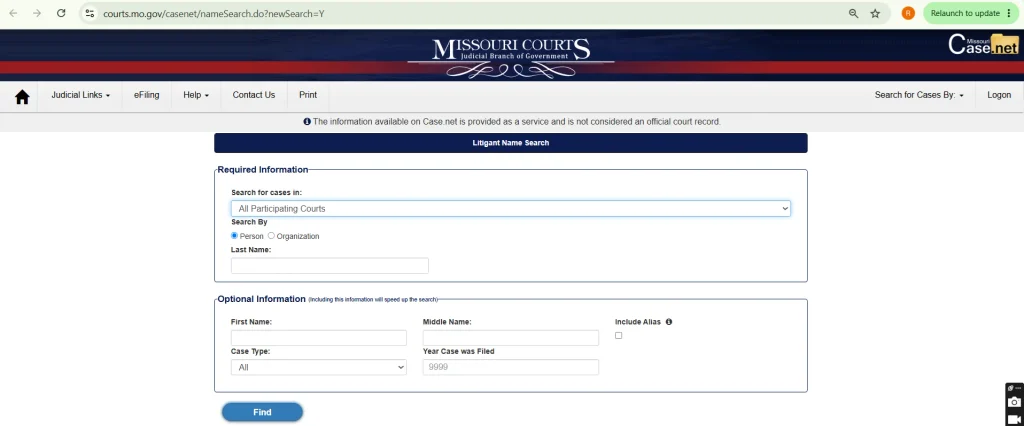
A form will appear. Fill in the required information:
- Search for cases in (keep “All Participating Courts” or pick one court)
- Search By (Person or Organization)
- Last Name
Now add the optional information to speed up the search:
- First Name
- Middle Name
- Case Type (Criminal, Civil, Traffic, Probate, etc.)
- Year Case was Filed
- Include Alias
Adding the first name and filing year is recommended because it gives you fewer and more accurate results.
Click the “Find” button. A list of matching Missouri court records will appear. Click the case number to open the full case.
Method 2: Search by Case Number
If you have your case number or traffic ticket number, click “Case Number Search“. This is the fastest way to find a case.
Fill in these two fields:
- Search for cases in (keep “All Participating Courts” or pick one court)
- Case/Ticket Number
Enter the number exactly as it appears on your court papers or ticket. Looking up a traffic ticket? Our Missouri traffic ticket search guide covers it step by step, even if you lost the ticket.
Click the “Find” button. Your case will appear on the screen.
Method 3: Search by Filing Date
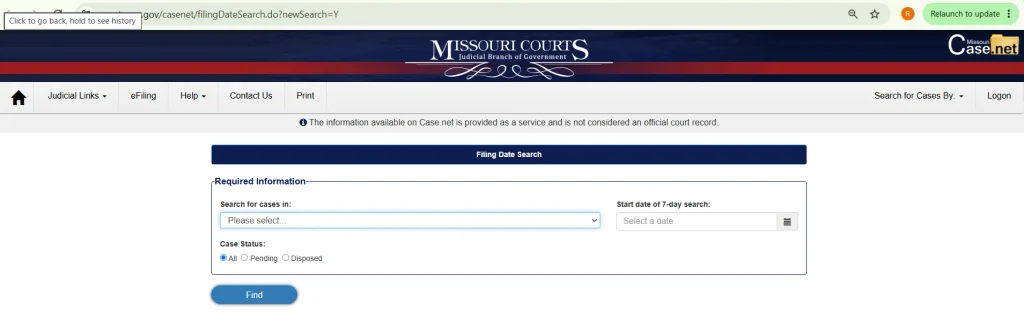
If you want to see all cases filed in a court during a specific week, click “Filing Date Search”.
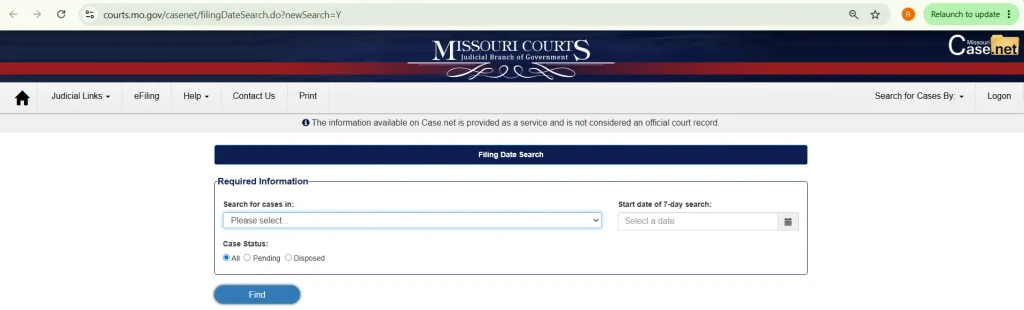
Fill in the required information:
- Search for cases in (select one court)
- Start date of 7-day search
- Case Status (All, Pending, or Disposed)
Select Pending for open cases and Disposed for cases that are closed.
Click the “Find” button. The system will show all cases filed in that court during those 7 days.
For step-by-step help with optional filters, monthly searches, and missing cases, read our Missouri filing date search guide.
Method 4: Find Your Court Date (Scheduled Hearing Search)
If you want to check upcoming court dates, click “Scheduled Hearing Search”.
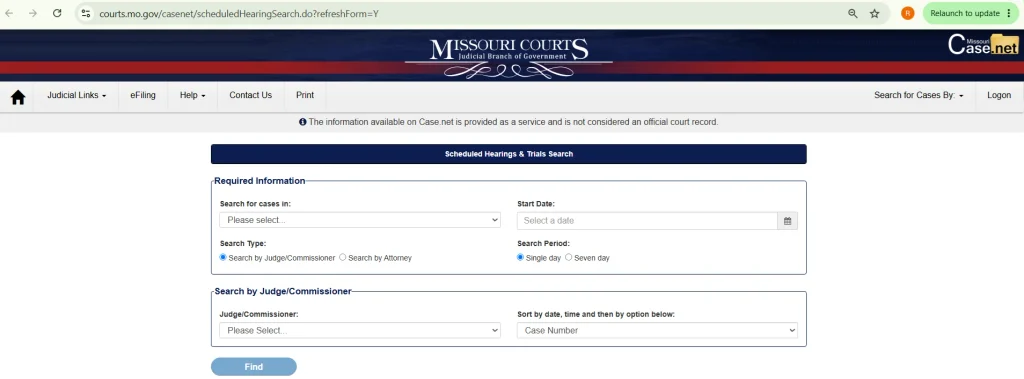
Fill in the required information:
- Search for cases in (select one court)
- Start Date
- Search Type (Search by Judge/Commissioner or Search by Attorney)
- Search Period (Single day or Seven day)
Next, select the judge from the list (or enter the attorney details if you chose Search by Attorney) and choose how to sort the results, such as by Case Number.
Click the “Find” button. You will see all hearings and trials scheduled for that date.
Method 5: Search the Judgment Index
If you want to check whether a person or business has a court judgment against them, click “Judgment Index“.
![Judgment Index Form]](https://mocaselookup.com/wp-content/uploads/2026/09/Judgment-Index-Form-1024x398.webp)
Fill in the required information:
- Search for cases in (keep “All Participating Courts” or pick one court)
- Last Name or Business Name
Now add the optional information:
- First Name
- Middle Name
- Case Type
- Year Case was Filed
- Include Alias
Click the “Find” button. A list of cases with judgments will appear.
Step 3: View Your Case Details
Once you open a case, you will see its full public information in separate sections, such as:
- Case Header (court, judge, case type, and filing date)
- Parties & Attorneys
- Docket Entries
- Charges, Judgments & Sentences
- Service Information
- Filings Due
- Scheduled Hearings & Trials
- Civil Judgments
- Garnishments
Open Docket Entries to see every action in your case, from the first petition to the latest court order. Our guide on how to view and read docket entries explains what each important entry means.
Open Scheduled Hearings & Trials to find your next court date.
You can also sign in and use “Track This Case” to get email alerts when something new is added to your case.
FAQs About Missouri CaseNet
Is Missouri CaseNet free to use?
Yes. Missouri Case Net is completely free, and you don’t need an account. You only need to sign in if you want to use Track This Case or Manage My Case.
Why can’t I find my case on Case.net?
Your case may be sealed, expunged, juvenile, or confidential. Under Missouri law, these records do not show on Case.net. Some Municipal Courts also do not share their records online. Check your spelling and search “All Participating Courts” again.
Can I view court documents on Missouri CaseNet?
Some documents can be viewed online. However, documents filed before July 1, 2023 can only be viewed at public terminals in local courthouses. For certified copies, contact the Circuit Clerk’s Office in your county.
How do I find my court date on Casenet MO?
Search your case by name or case number and open it. Then open the Scheduled Hearings & Trials section to see your next court date, time, and courtroom.
Can I do a Missouri warrant search on Casenet MO?
Case.net does not have a separate warrant search. But if a warrant is issued, it shows in the case’s Docket Entries, often after a Failure to Appear (FTA). For confirmation, contact the county sheriff’s office.
Does Case.net show criminal, traffic, and divorce cases?
Yes. Missouri CaseNet shows public criminal, civil, traffic, divorce, probate, and small claims cases from participating Missouri courts. Federal cases are not included. You can find those on PACER.
Can I search Missouri CaseNet on my phone?
Yes. Case.net works in any mobile browser. Just open courts.mo.gov/casenet and follow the same steps.
Can I pay court fines on Case.net?
Yes. Click “Make a Payment” on the homepage to pay traffic fines and court costs online.
Are Casenet, Case Net, and MO Casenet the same thing?
Yes. These are all names people use for the same official Missouri Courts website, courts.mo.gov/casenet. There is only one official Case.net site, so don’t trust any other site that asks you to pay for a search.
Conclusion
Looking up your case on Missouri CaseNet is quick and easy. Just open the official portal, pick a search option, and enter a name, case number, filing date, or court date. In a few minutes, you can see your case status, docket entries, judgments, and upcoming hearings, all for free. If the person in the case is in custody, our Missouri inmate search guide shows how to find where they are held.
Always use the official website at courts.mo.gov/casenet and stay away from fake Case.net sites. Check your case often so you never miss a court date. If you need help with your case, contact your local Circuit Clerk’s Office or a licensed attorney.