
How to Search a Missouri Case by Case Number in Under 5 Minutes
Have a case number from a court notice or traffic ticket? A Missouri Case Number Search on Case.net opens that exact case in under 5 minutes, for free.I tested every step below on the official portal.
Want to search your case with Case Number?
MoCaseLookup.com is an independent informational website and is not affiliated with Missouri Judiciary.
Quick Answer 🔢
For a Missouri Case Number Search, go to courts.mo.gov/casenet, the official Missouri case search website, and click “Case Number Search”. Keep “All Participating Courts” or choose your court, type the full case or ticket number, and click “Find”. Open the matching court case to see its public case information.
At a glance:
- Cost: Free, and no account is required
- Coverage: Participating circuit, municipal, probate, and appellate courts
- Best for: People who already have their number
- Results: One case, or a master case with its sub cases
How to Do a Missouri Case Number Search on Case.net
Case.net is the public side of the Missouri State Courts Automated Case Management System and the main source of Missouri public court records. The Missouri Judiciary runs it through the Office of State Courts Administrator (OSCA).
You can search court cases online here by name, date, or number. These Missouri CaseNet search instructions focus on the number option, since it is the most exact Missouri public case search available.
The five steps below show how to find a court case using only its number.
Step 1: Open the Official Missouri Case.net Website
Search “Missouri Case Number Search” on Google. The top official result is labeled Courts.mo.gov with the title “Case.net, Missouri Courts, MO.gov”.
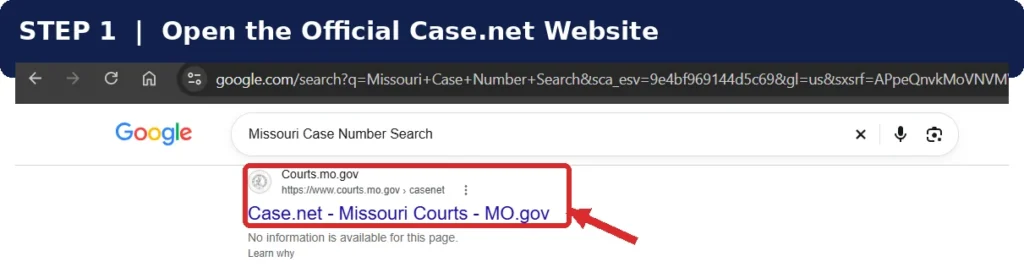
Click it to reach the official CaseNet website. This is the state’s free source for public access to court records.
Look at the address bar first. The real portal always ends in courts.mo.gov, and Case.net now shows its own scam alert about copycat sites and fake ticket texts. Our fake Case.net sites guide shows how to spot them.
Step 2: Select Case Number Search
The Case.net homepage shows five search icons in one row:
- Litigant Name Search
- Filing Date Search
- Case Number Search
- Scheduled Hearing Search
- Judgment Index
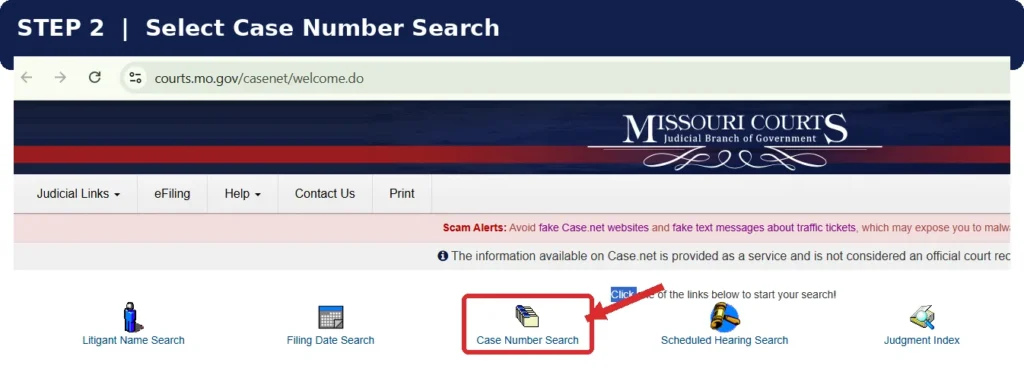
Click “Case Number Search”. It skips name matching, which makes it the fastest way to search Missouri case by number.
Step 3: Choose Your Court or Judicial Circuit
The next page is titled “Case/Ticket Number Search”.
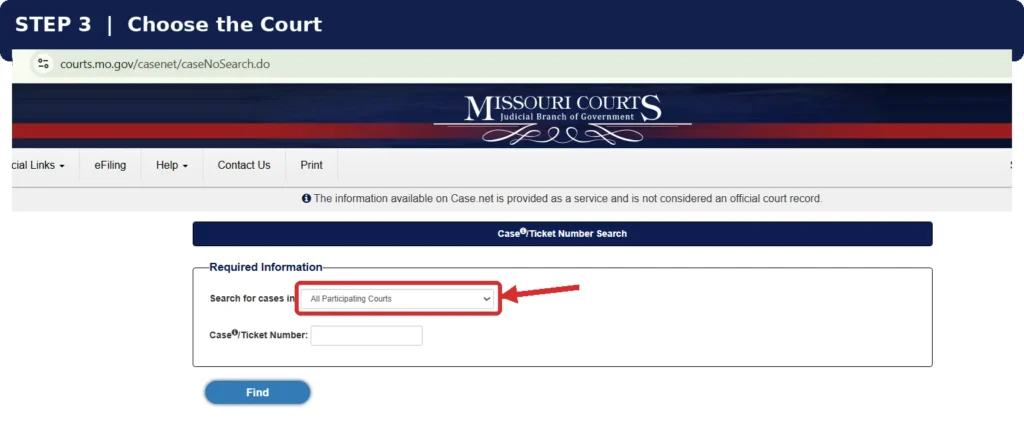
At the top sits the “Search for cases in” court dropdown menu. When I opened it, the default was All Participating Courts, which covers every circuit plus the appellate courts.
Leaving it on the default works fine when you are unsure about court jurisdiction.
For a tighter Missouri court selection, pick the court printed on your summons. St. Louis City Municipal Court, for instance, asks users to choose “City of St. Louis 22nd Judicial Circuit” here.
If you don’t know which court covers your county, the official Find a Court directory will tell you.
Step 4: Enter Your Case Number
Type the number into the “Case/Ticket Number” field.
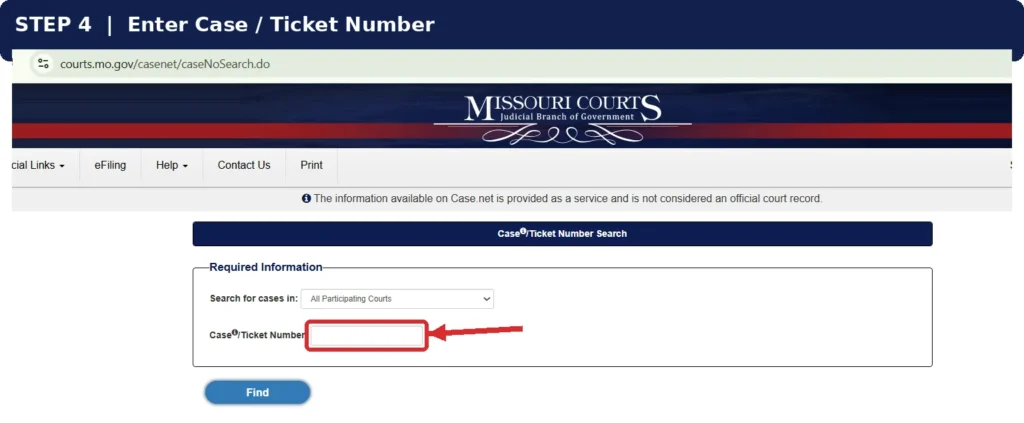
Copy it exactly from your paperwork. The search rejects partial entries, so typing half a number followed by a * returns nothing.
The court case number format differs between courts. A small info icon beside the field shows format help on Case.net itself.
A traffic citation can carry its own citation number, separate from the case number. St. Louis City tells drivers to use the number in the upper right corner of the ticket.
Remember only part of your number? A name search works better, covered in the FAQ below.
Step 5: Click Find and View Your Case Details
Press the “Find” button.
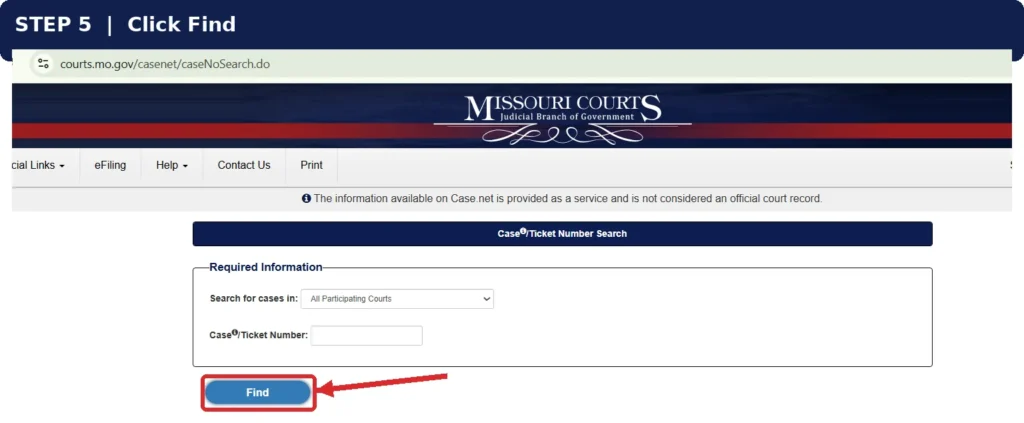
Case.net lists the matching case records. Click the blue case number link to open the full file.
Inside, the record is split into tabs:
- Case Header (judge, case type, filing date, status)
- Parties & Attorneys
- Docket Entries
- Charges, Judgments & Sentences
- Scheduled Hearings & Trials
- Civil Judgments
Docket Entries gives you the full docket history, from the first filing to the latest order. Some public court documents can also be opened from there.
Scheduled Hearings & Trials holds your next court date. Missing that date can lead to a warrant, so check it carefully.
Seeing More Than One Result?
Some cases are reopened under the same ID. The original becomes the master case, and each later one gets a two digit ending such as 01 or 02.
Open the sub case with the highest ending. It carries the newest status.
Track This Case
A “Track This Case” option inside the record sends email alerts, and some courts add text reminders. Cases handled by the Fine Collection Center are not eligible, according to the official Track This Case guide.
Missouri Case Number Search FAQs
Where Can I Find My Missouri Court Case Number?
Check the top of your summons, hearing letter, or petition. The case number on a court notice usually sits near the court name.
For a lost case number, call the Circuit Clerk’s Office in the county where the case was filed. They can look it up by name and date of birth.
What Information Do I Need for a Missouri Case Number Search?
Just the complete case or ticket number. Picking a court is optional.
What Case Details Can I Find Using a Missouri Case Number?
Most public records show the status, judge, parties, attorneys, docket entries, charges, hearing dates, and judgments.
Some case types display less, and certain documents are redacted to protect personal details.
Why Can’t I Find My Case Number on Missouri Case.net?
A typing error, a wrong judicial circuit, or a case type that Case.net hides by rule are the usual reasons a Missouri Case Number Search shows no result.
| Reason | What You See |
|---|---|
| Wrong digit or letter | No result |
| Wrong judicial circuit selected | No result until you switch back to All Participating Courts |
| Delayed case entry on a new ticket | Nothing for a few days while it is processed |
| Paternity case | Hidden until a judgment is entered |
| Protection order | Found only by exact number, with petitioner names hidden |
| Dismissed protection order | Not displayed |
| Dismissed, acquitted, or completed SIS case | Becomes a closed record under Missouri Sunshine Law 610.105 |
| Juvenile, adoption, and other sealed cases | Not public |
| Kansas City Municipal Court | Only open active and probation cases appear online |
| Older records | Some were never imported. St. Louis City asks people with cases filed before January 2, 2024 to contact the court |
Confidential court records can still be confirmed by the Circuit Clerk if you are a party to the case.
Can I Search Missouri Court Cases Without a Case Number?
Yes. A Missouri court case lookup also works through Litigant Name Search. Enter a last name, first name, and date of birth if known.
| Case Number Search | Litigant Name Search | |
|---|---|---|
| Works when | You have the number | You only know the name |
| Results | One exact case | Several possible matches |
| Partial input | Not accepted | Accepted |
| Speed | Fastest | Needs filtering |
How Can I Request Official Missouri Court Records Using a Case Number?
Send a public records request to the Circuit Clerk’s Office or municipal court that holds the case, and include the case number.
Case.net is a Remote Public Access tool, and its pages are not official court records. Employers, landlords, and other courts usually want certified court documents from the clerk instead.
Access rules come from Missouri Supreme Court Operating Rule 2 and the Missouri Sunshine Law, while copy fees vary by court. Kansas City Municipal Court, for example, posts its records request process and fees and typically responds within three business days.
Conclusion
A Missouri Case Number Search is the quickest online case lookup once you know the screens.
Open courts.mo.gov/casenet, choose “Case Number Search”, enter your full number, and press “Find”. Then pick the newest sub case and turn on tracking so a hearing never slips by.
When a case won’t appear, the table above usually explains why. For anything it doesn’t cover, your Circuit Clerk is the next call. Our main Missouri CaseNet guide covers the other four search methods.
Official sources:
- Missouri Case.net
- Case.net Public Inquiry help
- Track This Case guide
- St. Louis City case search instructions
- Kansas City Municipal Court records
- Missouri Revised Statutes 610.105