
Missouri Judgment Search: How to Find a Judgment Against Someone on Case.net
A Missouri judgment search shows every court case where a judgment was entered against a person or business. You can run it free on the Missouri Case.net Judgment Index with only a last name or business name. No account is needed.
MoCaseLookup.com is an independent informational website and is not affiliated with Missouri Judiciary.
Quick Answer 🏛️
To do a Missouri judgment search, go to courts.mo.gov/casenet, click Judgment Index, enter a last name or business name, and click Find. The results list every case with a judgment against that name. The search is free and needs no account.
- Only have a name: Judgment Index
- Have the case number: Case Number Search
- Want every case, not just judgments: Litigant Name Search
Missouri Judgment Index at a Glance
| Detail | Answer |
|---|---|
| Official website | courts.mo.gov/casenet → Judgment Index |
| Run by | Missouri Judiciary, Office of State Courts Administrator (OSCA) |
| Cost | Free |
| Account needed | No |
| Required field | Last name or business name |
| Courts covered | All Participating Courts (circuit and appellate courts on Case.net) |
| Public since | January 1, 2012, under Court Operating Rule 2 |
| How long a judgment lasts | 10 years, can be revived for another 10 |
Disclaimer: MoCaseLookup.com is not affiliated with Missouri Courts, the Missouri Judiciary, or OSCA. This guide was prepared by Jawad Ahmed, Legal Research Contributor, for general information only.
How Do You Search the Missouri Judgment Index?
You search the Missouri Judgment Index in four steps: open the Judgment Index on Case.net, enter a last name or business name, add optional filters, and click Find. Only the last name field is required.
Step 1: Open the Judgment Index on Case.net
Go to courts.mo.gov/casenet and click Judgment Index. The form opens with a grey notice at the top saying Case.net information is a service, not an official court record. For a loan, a lawsuit, or any legal use, get a certified copy from the Circuit Clerk.
Page not loading? See our Case.net down guide.
Step 2: Fill in the Required Information
The Required Information box has two fields.
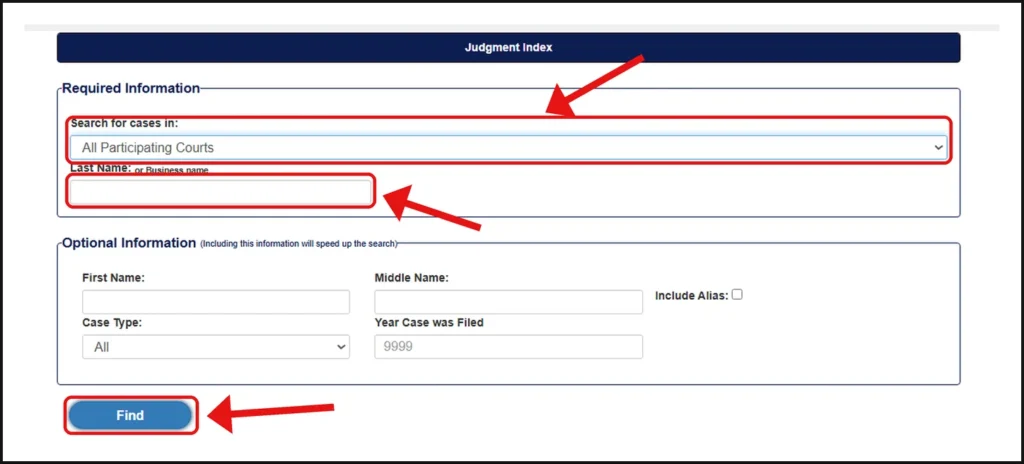
- Search for cases in: Set to All Participating Courts by default. Pick one circuit if you know where the case was filed.
- Last Name or Business Name: The only required field. A partial name works, and capital letters don’t matter.
Tip: For a business, search the main name without “LLC,” “Inc.,” or “Co.” first. This catches every version of the name.
Step 3: Add Optional Filters
The Optional Information box narrows your results. Use it for common last names like Smith or Johnson.
- First Name: Full name or the first few letters.
- Middle Name: Type only the first letter. The official help page says this field reads the middle initial.
- Include Alias: Tick it to also search maiden names and AKAs.
- Case Type: All, Civil, Criminal, Probate, Traffic/Municipal, or Infraction (fine-only violations).
- Year Case was Filed: Four digits, like 2024. The grey “9999” is only a sample.
- Case Status: All, Pending (open), or Disposed (closed). Criminal and traffic cases count as disposed once the plea is accepted.
- Location: Shows court divisions, including municipal divisions, after you pick one circuit and county.
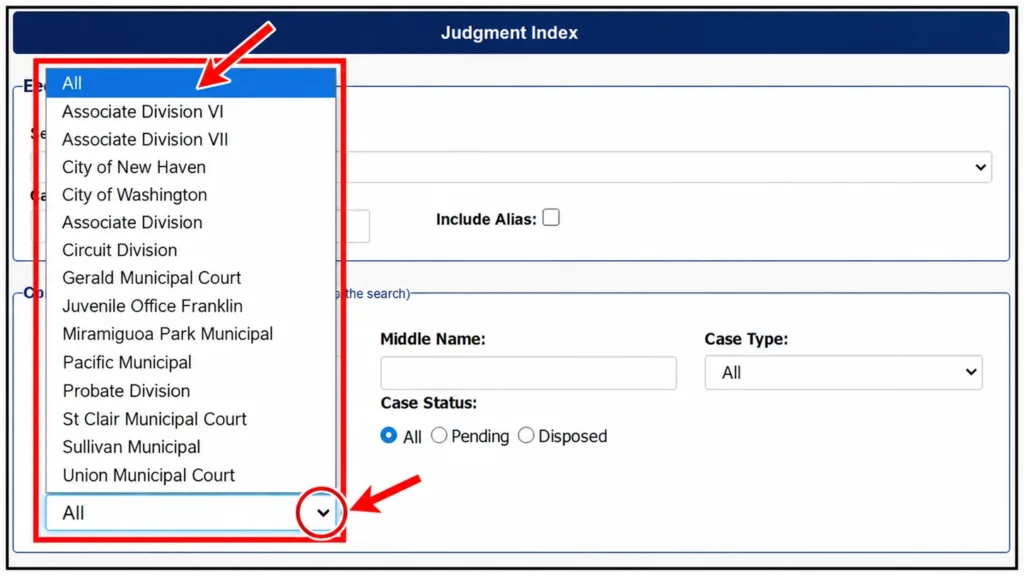
Tip: Start with last name and first name only. Add the year or case type only if you get too many results.
Step 4: Click Find
Click Find. The results list each case with a judgment against that name.
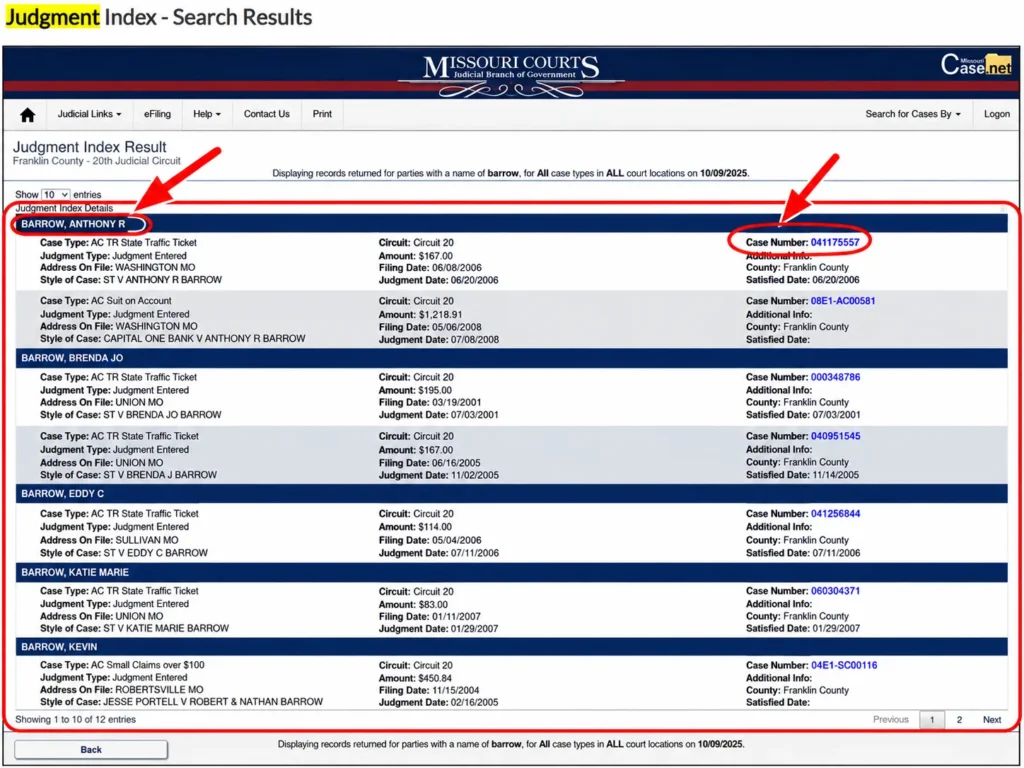
No results? Check the spelling, remove filters, search All Participating Courts, and tick Include Alias.
How Do You Read Missouri Judgment Index Results?
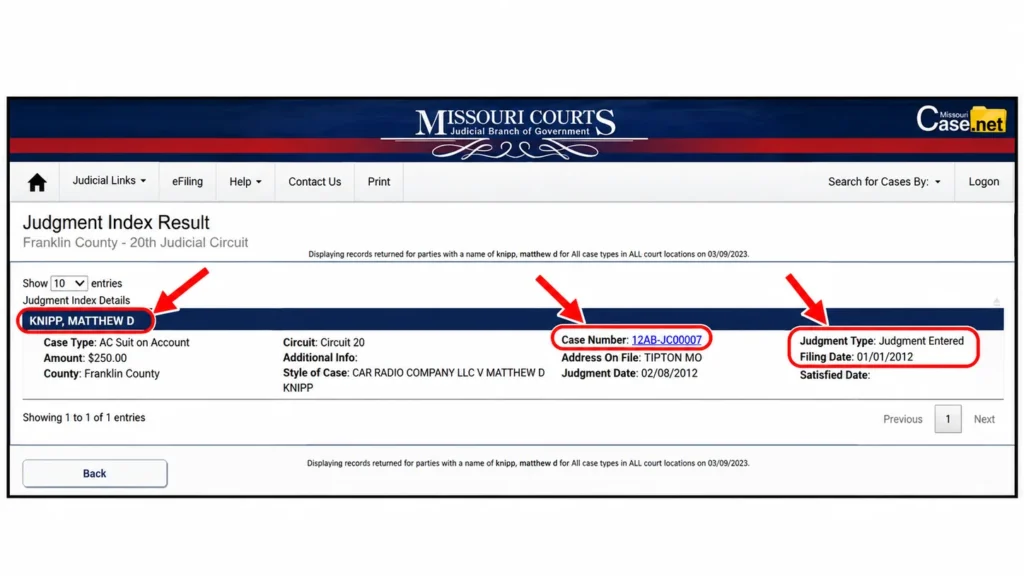
Each result row is one case with a judgment against the searched name. The Case Number opens the full case, the Judgment Type opens the Civil Judgments page, and Additional Info shows if the judgment was set aside, revived, or discharged in bankruptcy.
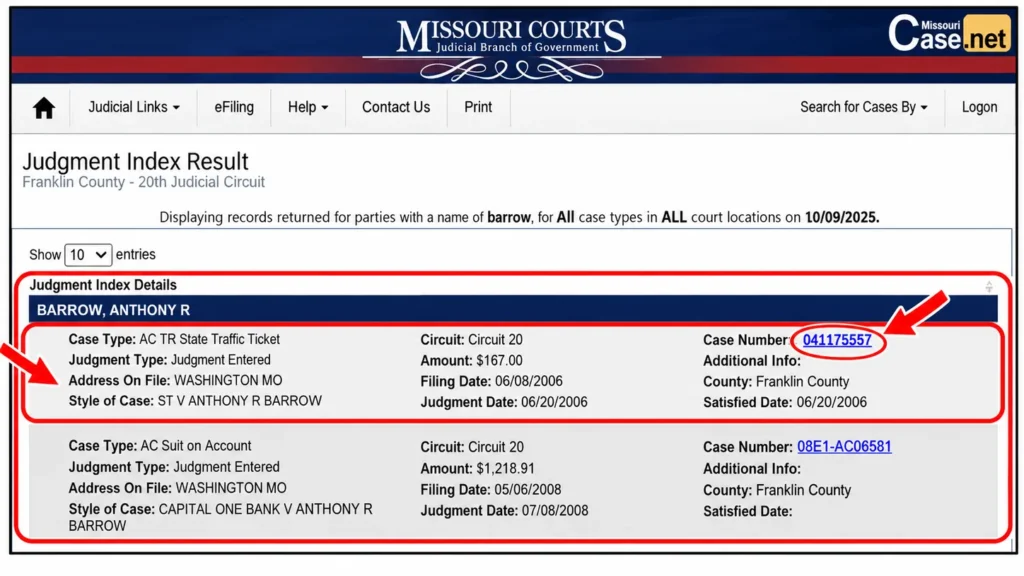
- Case Number: Opens the Case Header (court, judge, case type, filing date) and the Parties & Attorneys, Docket Entries, and Garnishments tabs.
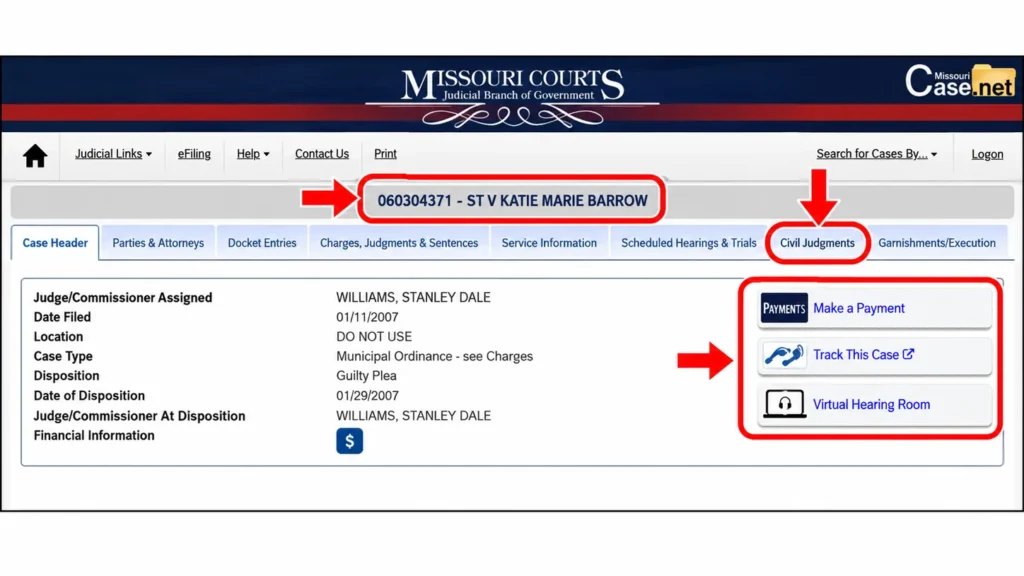
- Judgment Type: Opens Civil Judgments, which shows who the judgment is for, who it’s against, the amount, and the date.
- Additional Info: Usually blank. When a link shows, it opens Docket Entries:
- Vacate/Set Aside: The court cancelled the judgment.
- Scire Facias/Rev Judgment: The creditor revived the judgment.
- Bankruptcy Discharge: The debt was discharged in bankruptcy court.
To get email alerts on a case, use Track This Case.
Judgment Index vs Litigant Name Search: What’s the Difference?
The Judgment Index shows only cases where a judgment was entered against the person. Litigant Name Search shows every case the person is part of, including lawsuits with no judgment yet. For a tenant or employee background check, run both.
| Judgment Index | Litigant Name Search | |
|---|---|---|
| What it shows | Cases with a judgment against the person | Every case the person is part of |
| Lawsuits with no judgment yet | No | Yes |
| Best for | Unpaid judgments, background checks | Full court history |
What Types of Judgments Show in Missouri Court Records?
Missouri Judgment Index results can include money judgments, default judgments, consent judgments, debt collection cases (Suit on Account), landlord cases (rent and possession), and criminal or traffic fines.
| Judgment type | What it means |
|---|---|
| Money judgment | The court orders one side to pay the other, like an unpaid credit card or medical bill. |
| Default judgment | The person didn’t respond or didn’t appear, so the court ruled without them. |
| Consent judgment | Both sides agreed, and the court entered the deal as a judgment. |
| Suit on Account (AC) | A collection case filed by a creditor or debt buyer in associate circuit court. |
| Rent and possession | The landlord wins unpaid rent and the right to take the property back. |
| Criminal and traffic | Fines, court costs, and sentences after a plea or trial. |
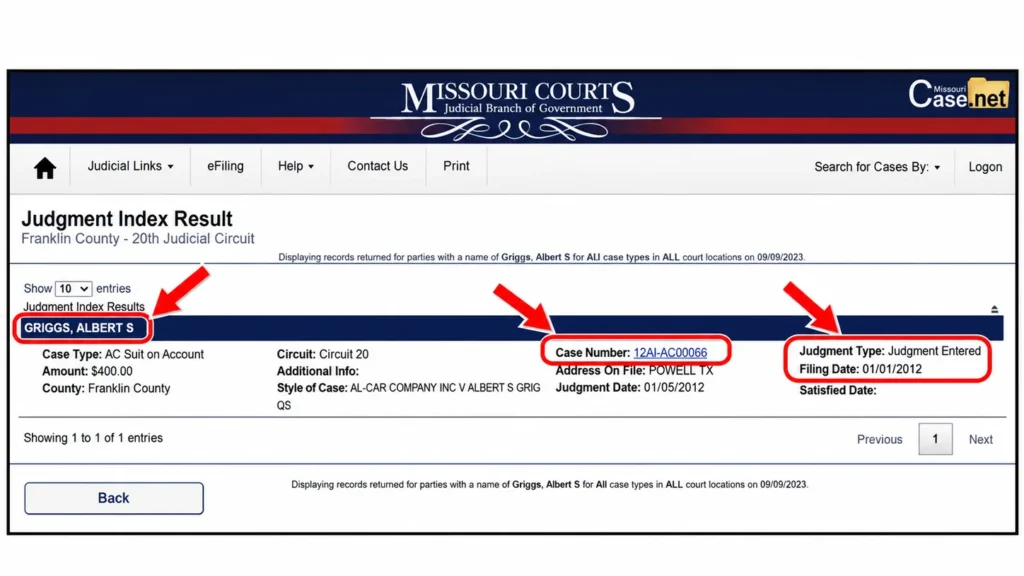
Tip: Open the case and check the plaintiff’s name. A debt buyer’s name there usually means the original debt was sold.
What Is a Transcript Judgment in Missouri?
A transcript judgment is a copy of a Missouri judgment filed in another county so the creditor can enforce it there. It can appear in three ways:
- Same county: Entered and transcribed in the same court and case.
- Another county, same circuit: For example, entered in Franklin County and transcribed in Gasconade County.
- Another circuit: For example, a Franklin County judgment transcribed in St. Charles County.
Tip: If the dates and amounts match, it’s one debt showing twice, not two judgments.
How Do You Check if a Missouri Judgment Is Paid?
A paid judgment stays in the Missouri Judgment Index. To confirm payment, open the case and look in Docket Entries for a “Satisfaction of Judgment” entry with a date.
If you paid in full and there’s no satisfaction entry, ask the creditor or their attorney to file it. Keep your proof of payment.
How Long Does a Judgment Last in Missouri?
A Missouri judgment and its lien last 10 years from the date of entry (Missouri Supreme Court Rule 74.08). The creditor can revive it for another 10 years by filing a motion within that period (Rule 74.09). If it’s not revived and no payment is on record, RSMo § 516.350 presumes it paid.
General information, not legal advice. Talk to a licensed attorney if a judgment affects you.
Why Doesn’t a Judgment Show Up on Case.net?
A judgment may not show on Case.net if the case is sealed, expunged, juvenile, or mental health related, or if it came from a municipal or federal court outside the statewide system. A misspelled name or too many filters can also hide it.
- Federal judgments: Search PACER instead.
- City court judgments: Contact that municipal court clerk.
- Old fine-only judgments: Default judgments were entered on some infraction charges from August 28, 2009, to February 25, 2010, when Missouri’s infraction law changed.
Where Else Can You Find Judgments in Missouri?
- Circuit Clerk’s Office: Certified copies, older paper files, and public terminals.
- PACER: Federal court and U.S. Bankruptcy Court judgments.
- Municipal court clerk: City courts not on Case.net.
- County Recorder of Deeds: Liens recorded against real estate.
What Should You Do If a Judgment Shows Under Your Name?
Your next step depends on why it’s there:
- It’s not you: Compare the details in Parties & Attorneys. If the record is wrong, contact the Circuit Clerk of that court.
- You already paid: Ask the creditor to file a Satisfaction of Judgment.
- You never knew about the case: This is common with default judgments sent to an old address. Talk to a licensed Missouri attorney soon about setting it aside, because time limits apply. The Missouri Bar runs a lawyer referral service.
FAQs About Missouri Judgment Search
Is the Missouri Judgment Index free?
Yes. The Missouri Judgment Index on Case.net is free and needs no account.
Can I search a business for judgments in Missouri?
Yes. Type the business name in the Last Name field, starting without “LLC” or “Inc.”
Does a paid judgment still show on Case.net?
Yes. A paid judgment stays in the index. Check Docket Entries for a Satisfaction of Judgment.
Do Missouri civil judgments show on credit reports?
No. Equifax, Experian, and TransUnion stopped listing civil judgments in 2017. Landlords, employers, and background check companies can still find them on Case.net.
How do I get a copy of a Missouri judgment?
Ask the Circuit Clerk’s Office in the county where the case was filed for a certified copy. A fee may apply.
Does the Judgment Index show lawsuits still in progress?
No. It shows only cases with a judgment. Use Litigant Name Search for open lawsuits.
Can I search the Missouri Judgment Index on my phone?
Yes. Open courts.mo.gov/casenet in any mobile browser and follow the same steps.
Conclusion
To run a Missouri judgment search, open the official Judgment Index, enter a last name or business name, and click Find. Then open the case number to check if the judgment was paid, revived, or set aside. Never pay a third-party site for this search. If a case shows a missed court date, see our Missouri warrant search guide.
Sources
- Judgment Index – Missouri Courts
- Case.net Search Help – Missouri Courts
- Case.net Public Inquiry – Missouri Courts
- Missouri Supreme Court Rule 74.08