
How to Do a Missouri Filing Date Search on CaseNet (Find Cases by Date)
Missouri CaseNet’s Filing Date Search is the official Missouri court filing date search. It lists every public case filed in one Missouri court during a 7-day period. You don’t need a party name or a case number, only the court and a start date, which makes it the main way to look up Missouri court cases by filing date without a case number. It’s useful for checking new filings in a county, or for finding a case when all you know is roughly when and where it was filed.
MoCaseLookup.com is an independent informational website and is not affiliated with the Missouri Judiciary.
Quick Answer 🏛️
To run a Missouri filing date search, open courts.mo.gov/casenet and choose Filing Date Search. Select one court in “Search for cases in,” pick a start date, and click Find. CaseNet shows the public cases filed in that court during the 7 days starting on your date. The search is free and needs no account.
- Have a name instead? Use the Litigant Name Search.
- Have a case or ticket number? Use the Missouri case number search.
- Need an upcoming court date? Use the Scheduled Hearing Search.
Disclaimer: This guide is for general information only. For official case information, always check the official Missouri CaseNet website. Case.net itself notes that its information is provided as a service and is not an official court record.
Step 1: Open the Official Missouri CaseNet Website
Open Chrome, Safari, or any browser and go to courts.mo.gov/casenet. This is the only official Case.net site (often called MO CaseNet), maintained by the Missouri Judiciary’s Office of State Courts Administrator (OSCA). Any site that asks you to pay for a Missouri court case search is not Case.net.
Case.net is available Monday through Friday, 6 a.m. to 1 a.m. Central Time. Outside those hours, the search may not load. If the site won’t open during normal hours, see our guide on what to do when Case.net is down.
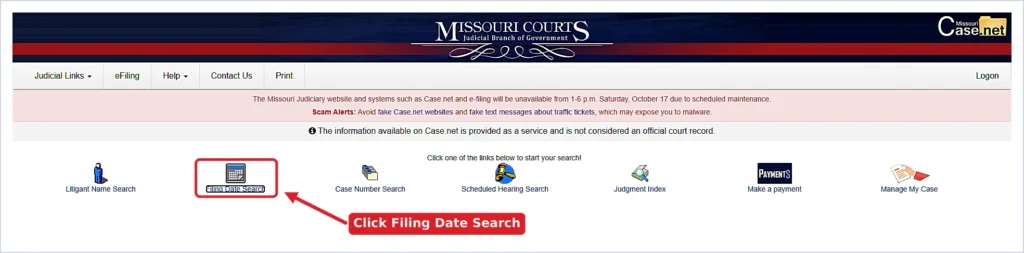
Step 2: Click “Filing Date Search”
On the Case.net homepage, click Filing Date Search. If you’re already on another Case.net page, open the Search for Cases By menu in the top-right corner and choose Filing Date Search from the list.
Step 3: Fill In the Filing Date Search Form
The form opens with a Required Information box. More fields appear only after you pick a trial court.
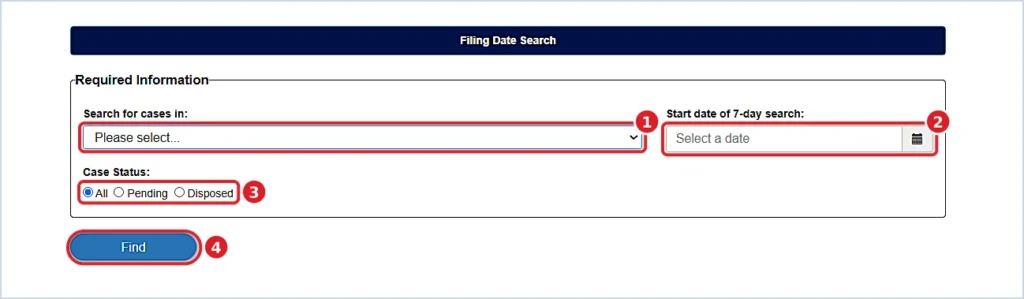
Required: Search for Cases In
Click the Search for cases in dropdown and choose one court. Unlike the name and case number searches, Filing Date Search does not offer “All Participating Courts,” according to Missouri Courts’ Case.net search help. You can search only one location at a time.
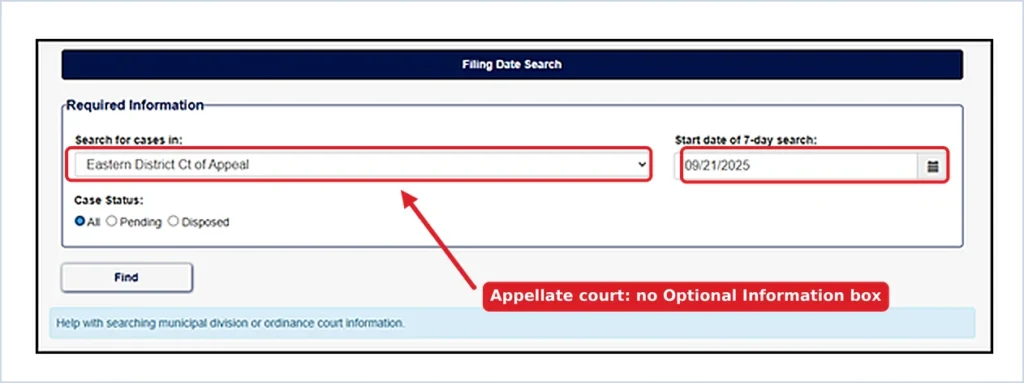
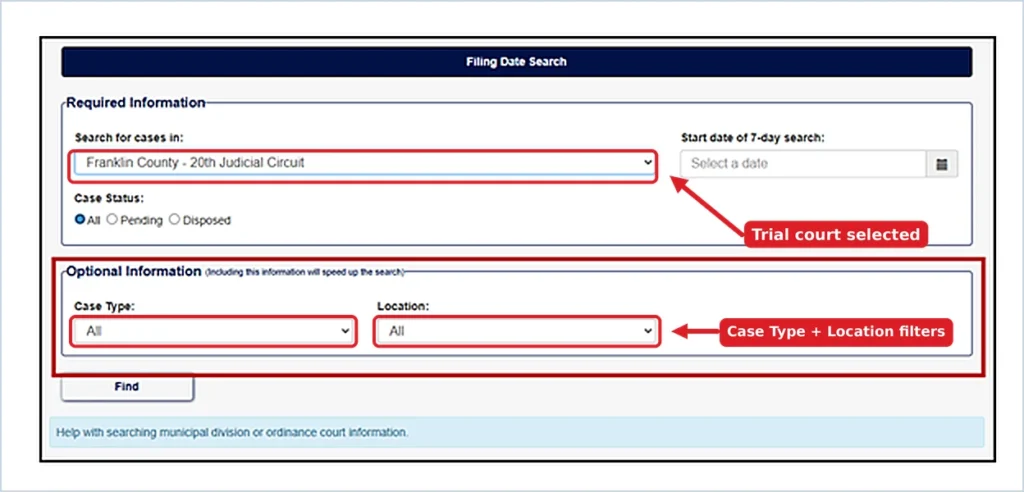
The dropdown lists trial courts by county and judicial circuit, for example “Franklin County – 20th Judicial Circuit.” It also lists the Missouri Court of Appeals districts. Your choice changes the rest of the form:
- Trial court (county or circuit): an Optional Information box appears below the form, with filters to narrow your results.
- Appellate court (for example, Eastern District Ct of Appeal): only the required fields are shown, with no optional filters.
Required: Start Date of 7-Day Search
Click the calendar icon and pick a date, or type it in mm/dd/yyyy format. CaseNet returns cases filed on that date and the next six days.
For example, a start date of 10/05/2026 shows cases filed from October 5 through October 11, 2026. There’s no option for a single day or a full month. Every Missouri CaseNet search by date covers exactly seven days.
Required: Case Status
Below the court and date fields, choose a Case Status:
- All: every public case filed in that week. This is the default.
- Pending: only cases that are still open.
- Disposed: only cases that have reached a final decision. In criminal and traffic cases, a case counts as disposed once the plea is accepted.
Optional: Case Type and Location
If you picked a trial court, the Optional Information box appears. The form notes that filling it in speeds up the search.
- Case Type: filter by Civil, Criminal, Probate, Traffic/Municipal, or Infraction. The default is All.
- Location: pick a specific court division within your selection, such as an associate circuit division or a municipal division that uses the statewide case management system.
When a whole circuit with several counties is selected, a County field can also appear so you can limit results to one county. Below the form there’s also a help link for searching municipal division or ordinance court information.
Step 4: Click Find and Review the Results
Click Find. CaseNet shows a list of the public cases filed in your chosen court during that 7-day window.
Click any case number link to open the case’s information screens. The Case Header shows the court, judge, case type, and filing date. This is where you check a case’s filing date on CaseNet. Docket Entries show every action in the case since it was filed.
To check a case’s filing status online after you find it, sign in and use Track This Case to get email alerts when new entries are added.
How to Search Missouri Civil or Criminal Cases by Filing Date
To see only civil or only criminal cases, pick a trial court first, then set the Case Type dropdown in the Optional Information box. Here’s what each case type covers, based on Missouri Courts’ Case.net help:
| Case Type | What It Includes |
|---|---|
| Civil | Circuit and associate circuit civil cases, transcript judgments, and administrative orders |
| Criminal | Circuit and associate circuit felonies, misdemeanors, and infractions |
| Probate | Guardianships, conservatorships, trusts, estates, and wills on deposit |
| Traffic/Municipal | Moving and non-moving traffic violations and ordinance violations |
| Infraction | Violations where the only possible sentence is a fine |
Mental health cases are filed under probate but are not public, so they never appear in results.
For a busy court, combine the case type with Pending status. For example, Criminal + Pending in a large county shows only new criminal cases that are still open, which is much shorter than the full weekly list.
How to Find Newly Filed Cases in Missouri
Filing Date Search is the only Case.net tool that lists new cases without a name or number. That makes it the best way to search new court filings and recently filed cases in a specific Missouri county.
Cases Filed Today or This Week
To check new filings for the current week, set the start date to Monday of this week. To see cases filed today, use today’s date as the start date. The results will include only what has been entered so far.
A case appears on Case.net only after the circuit clerk enters it into the system. A lawsuit or charge filed today may not show up right away. If you expect a case and don’t see it, run the same search again a few days later.
Cases Filed Last Week or Over a Full Month
Because each search covers exactly seven days, you can cover a longer period by running back-to-back searches. Start each new search seven days after the last one.
For example, to cover September 2026:
| Search | Start Date | Covers |
|---|---|---|
| 1 | 09/01/2026 | Sept 1–7 |
| 2 | 09/08/2026 | Sept 8–14 |
| 3 | 09/15/2026 | Sept 15–21 |
| 4 | 09/22/2026 | Sept 22–28 |
| 5 | 09/29/2026 | Sept 29–Oct 5 |
For last week only, set the start date to last Monday.
How to Search Missouri Court Filings by County
Missouri’s circuit courts are organized into judicial circuits. Some circuits cover one county, and others cover several. To run a Missouri court case search by filing date and county:
- In Search for cases in, choose the county or circuit where the case was filed.
- If you selected a multi-county circuit and a County field appears, choose the county you want.
- Use Location to narrow results to a specific court division in that county.
For example, the 37th Judicial Circuit includes Carter, Howell, Oregon, and Shannon counties. You can search all four at once or limit the search to one.
If you don’t know which county the case was filed in, you’ll need to search each likely county separately, since this search can’t cover the whole state at once.
How to Find When a Specific Missouri Case Was Filed
If you only need to know when one particular case was filed, a weekly filing date search isn’t the fastest tool. Every Missouri case record shows its filing date in the Case Header, and you can reach it in two ways:
- If you have the case number: run a case number search on CaseNet, open the case, and check the filing date in the Case Header.
- If you have a name: run a CaseNet name search and enter the four-digit year in the Year Case Was Filed field to shorten the list. Open the correct case and check the Case Header.
The case number itself can also help. Under Missouri’s case numbering rules, most circuit court case numbers start with the last two digits of the filing year, so a number beginning with “24” was filed in 2024. Traffic cases are an exception, because they usually use the ticket number as the case number.
If you know the year and the court but not the exact date, you can also run several weekly filing date searches in that court until the case appears.
Why a Case May Not Appear in Your Filing Date Search
If a case you expect doesn’t show up, one of these is usually the reason:
- Wrong court. The search only covers the one court you selected. Check the county and circuit.
- Date outside the window. Results cover only seven days. Move the start date back or forward a week.
- Case Status filter. If you chose Pending or Disposed, switch to All.
- Paternity case without a judgment. Under Case.net display rules, paternity cases don’t display until a judgment is entered.
- Dismissed protection order. Dismissed protection order cases don’t display. Cases with a judgment do appear, but the petitioner’s name and identifying details are hidden.
- Confidential records. Sealed, expunged, juvenile, adoption, and mental health cases are not public under Missouri law and never appear on Case.net.
- Court not on the statewide system. Some municipal courts keep their records outside Case.net. Contact that court directly.
- Federal case. Case.net covers Missouri state courts only. Federal cases are on PACER.
Missouri CaseNet Filing Date Search Not Working? Quick Fixes
If the search won’t run or returns an error, try these:
- Choose a specific court. The search won’t run without a selection in “Search for cases in.”
- Check the date format. If you typed the date, use mm/dd/yyyy, for example 10/05/2026. Picking from the calendar avoids format errors.
- Check the time. Case.net may not load outside its listed hours (see Step 1).
- Refresh or switch browsers. Clear your cache or try another browser if the form freezes.
- Check for an outage. The Case.net homepage links to a System Unavailability Log.
For bigger problems, read our full guide on Case.net outages and errors.
Can You View Court Documents After a Filing Date Search?
Yes, but only for public documents filed on or after July 1, 2023. Under Missouri’s Remote Public Access rules, you can view, download, and print those documents from your computer or phone. Look for blue document links in the case’s Docket Entries.
Documents filed before July 1, 2023, can only be viewed on the public access terminals at a Missouri courthouse. For certified copies, contact the Circuit Clerk’s Office in the county where the case was filed. Missouri Courts explains the rules on its Remote Public Access page.
FAQs About Missouri Filing Date Search
Is the Missouri CaseNet Filing Date Search free?
Yes. Filing Date Search is free on courts.mo.gov/casenet, and you don’t need an account or login.
Can I search all Missouri courts by filing date at once?
No. Filing Date Search requires you to choose one court and doesn’t offer “All Participating Courts.” To cover several counties, run a separate search for each one.
Can I search a whole month or year by filing date?
Not in one search. Each search covers seven days from your start date. For a longer period, run back-to-back weekly searches, each starting seven days after the last.
Is the filing date the same as the arrest date?
No. On Missouri CaseNet, the filing date means the date the case was filed with the court, such as when a petition was filed or criminal charges were brought. In criminal cases, charges are often filed days or weeks after an arrest, so the filing date can be later than the arrest or incident date.
Can I use Filing Date Search on my phone?
Yes. Case.net works in mobile browsers. Open courts.mo.gov/casenet on your phone and follow the same steps.
Are Filing Date Search results an official court record?
No. Case.net states that its information is provided as a service and is not an official court record. Missouri’s Court Operating Rule 2 makes file dates a public index, but for an official or certified record, contact the Circuit Clerk’s Office.
Conclusion
Filing Date Search is the quickest way to see which cases were filed in a Missouri court during a given week, without needing a name or case number. Pick one court, choose a start date, set the case status, and narrow it down with Case Type or Location if the list is long.
If you find a case you want to follow, use Track This Case for email updates. For anything beyond public case information, contact your local Circuit Clerk’s Office or a licensed Missouri attorney.

Sources
This guide is based on official Missouri Judiciary resources:
- Missouri Case.net – Official Search Portal – Missouri Courts
- Case.net Filing Date Search – Missouri Courts
- Case.net Database Specific Search Methods – Missouri Courts (Filing Date Search fields, case types, display exceptions)
- Case.net Public Inquiry – Missouri Courts (Case.net is not an official court record)
- Welcome to Case.net – Missouri Courts (availability hours, System Unavailability Log)
- Remote Public Access – Missouri Courts (document access for filings on or after July 1, 2023)
- Court Operating Rule 2.04 – Access to Case Records – Supreme Court of Missouri
- 37th Judicial Circuit – Missouri Courts (counties in the circuit)
- 38th Judicial Circuit – Case Numbering – Missouri Courts (case number format)
- PACER – Federal court records
Last reviewed: October 2026