
How to Look Up Your Missouri Traffic Ticket Online (Free) in Under 2 Minutes
Got a traffic ticket in Missouri and lost track of it, or just want to see what it says before your court date? You can do a Missouri traffic ticket search online for free on Case.net.
All you need is your ticket number or your name.
Quick Answer
To do a Missouri traffic ticket search, go to courts.mo.gov/casenet and click “Case Number Search”. Enter the ticket number from your citation and click “Find”. If you lost your ticket, use “Litigant Name Search” and set the case type to Traffic/Municipal.
- Have your ticket: Case Number Search
- Lost your ticket: Litigant Name Search
- Want to pay without going to court: Plead and Pay (if your ticket allows it)
Disclaimer: MoCaseLookup.com is an independent guide and is not affiliated with the Missouri Judiciary or Missouri Courts.
Step 1: Open the Official Missouri Case.net Website
Open any browser like Chrome or Safari and go to courts.mo.gov/casenet. This is the only official site, it’s free and you don’t need an account.
Case.net is open Monday through Friday, 6 a.m. to 1 a.m. Central Time. If it won’t load, read why Case.net may not be working.
Step 2: Search for Your Ticket
Use the option that matches what you have.
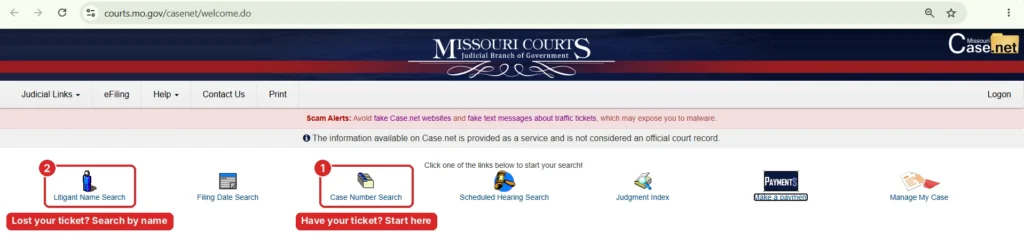
Option 1: Search by Ticket Number
On most Missouri citations, the ticket number is in the upper right corner. The court date is usually at the top left, along with the violation you were charged with. Layouts can differ a little from city to city.
On Case.net, click “Case Number Search”.
- Leave “Search for cases in” set to All Participating Courts, or pick your court if you know it.
- Type your ticket number in the Case/Ticket Number box.
- Click “Find”.
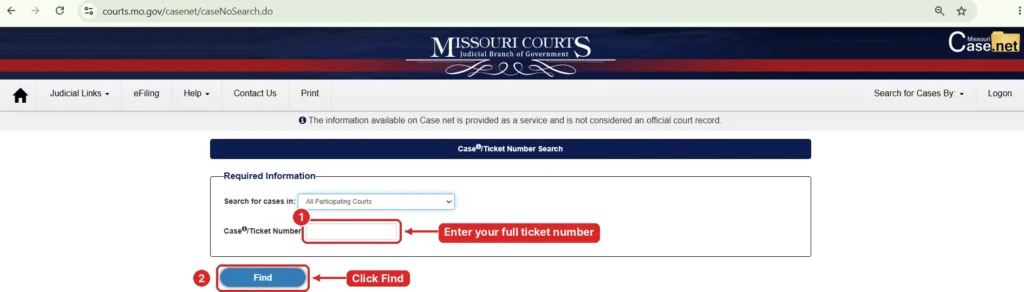
This search is strict. Partial numbers don’t work, so type the full number exactly as it appears on your ticket.
If you see more than one result with the same number ending in 01, 02 and so on, these are sub cases opened under the same ticket. Open the one with the highest number, because it has the latest information.
For a full walkthrough of this form, read our Missouri Case Number Search guide.
Option 2: Search by Name (If You Lost Your Ticket)
Click “Litigant Name Search” instead.
- Enter your last name (this is required).
- Add your first name. Only the first few letters are needed.
- Under Case Type, select Traffic/Municipal. This covers moving and non moving traffic tickets and city ordinance violations.
- Add the Year Case was Filed to cut down the list.
- Click “Find”.
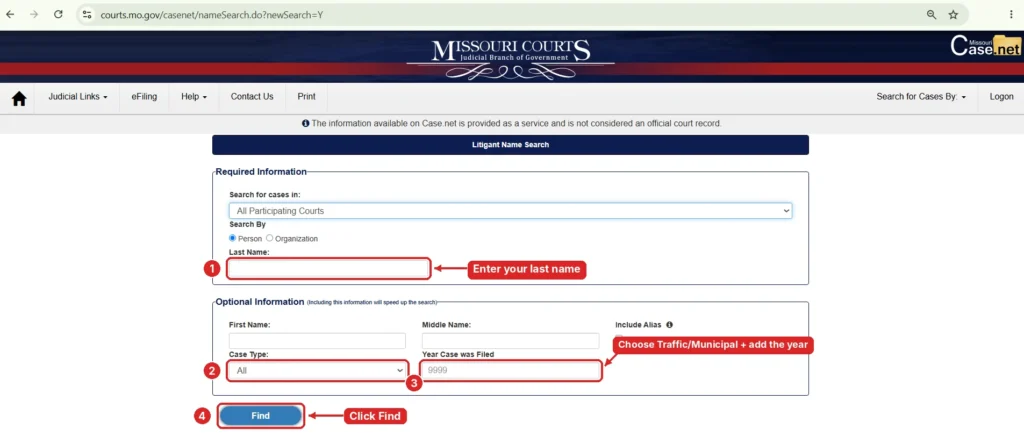
If your name is common, Case.net may refuse the search and ask for more details. Adding your first name and the year usually fixes it.
Know which county you got the ticket in? Pick that court instead of All Participating Courts. You’ll then see County and Location filters, and the location list includes the municipal divisions in that county. This is the fastest way to find a city ticket.
Our Litigant Name Search guide covers every field in detail.
Step 3: Open Your Case and Check the Details
Click your case number to open the ticket. Here’s what to look at:
- Case Header: the court, the case type and the filing date
- Charges: the exact violation on your ticket
- Docket Entries: every action on your case so far
- Scheduled Hearings & Trials: your court date, time and courtroom
- Case Status: Pending means the ticket is still open. Disposed means it’s closed.
Our Missouri CaseNet guide explains each tab in more detail.
Want a reminder before your court date? Click “Track This Case” on your ticket page to get alerts by email or text.
Step 4: Choose How to Handle Your Ticket
Once you know your charge and court date, decide what you want to do:
| Your choice | What to use | When |
|---|---|---|
| Pay and skip court | Plead and Pay | Before your court date (only some tickets qualify) |
| Fight the ticket | Go to court and plead not guilty | On the date and at the court listed on your ticket |
| Need more time or can’t afford the fine | Manage My Case | Anytime your ticket is open |
| Already went to court and owe money | Pay By Web | After your case is closed |
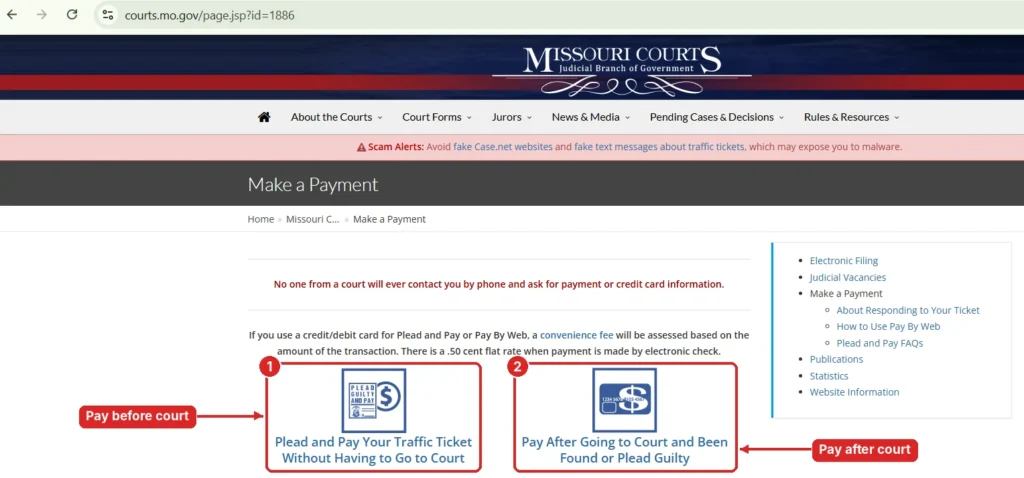
Step 5: Pay Your Missouri Traffic Ticket Online with Plead and Pay
If your ticket doesn’t need a court appearance, you can plead guilty and pay it online:
- Open your ticket on Case.net.
- Click “Plead and Pay”.
- Check your fine and court costs on the screen.
- Finish all the steps and make the payment.
- Save the final confirmation. This is your proof that the plea and payment went through.
Clicking Plead and Pay just to see your total does not count as a guilty plea. Nothing is final until you complete the whole process and get the confirmation screen.
Not sure what your ticket will cost? Missouri uses a statewide Uniform Fine Schedule for tickets that can be paid without court. Find your violation in the right list:
- State Traffic Fine Schedule: tickets written under state traffic law, including Missouri State Highway Patrol tickets
- Municipal Fine Schedule: city tickets handled by municipal courts
- Water Patrol Fine Schedule: boating and watercraft citations
- Conservation Fine Schedule: hunting and fishing citations
For more details, see the official Plead and Pay FAQs and About Responding to Your Ticket from Missouri Courts.
Missouri Traffic Ticket Search FAQs
Can I Look Up a Missouri Traffic Ticket by License Plate?
No. Case.net does not have a license plate search. You need your ticket number or your name. If you lost the ticket, use Litigant Name Search with the Traffic/Municipal case type.
Why Is My Traffic Ticket Not Showing on Case.net?
It’s probably still being processed. After the officer writes the ticket, a prosecutor has to review it and the court clerk has to file it. According to Missouri traffic attorneys, this can take anywhere from a few weeks to a few months.
Some municipal courts tell drivers to wait at least 10 days before searching. A few small municipal courts don’t use Case.net at all, so call the court listed on your ticket if you still can’t find it.
What Do Pending and Disposed Mean on My Ticket?
Pending means something still needs to happen, like a payment or a hearing. Disposed means the case is finished. According to the Case.net Search Help page, a traffic case changes to Disposed once your plea is accepted.
What Is the Difference Between a Moving, Non Moving and Infraction Ticket?
A moving violation happens while you’re driving, like speeding or running a red light. These usually add points to your license.
A non moving violation covers things like expired tags or parking issues, and these usually don’t add points. An infraction is a minor offense where the only penalty is a fine.
What Does It Mean if Plead and Pay Is Not Available?
It usually means your violation needs a court appearance. Only offenses listed on the Uniform Fine Schedule, often handled through the court’s Violations Bureau, can be paid online. If the option doesn’t show, plan to go to court on your date or call the clerk.
Does Paying My Ticket Online Count as a Guilty Plea?
Yes. Completing Plead and Pay is a guilty plea, and you give up your right to a hearing.
How Do I Pay My Ticket After Going to Court?
Use Pay By Web. Search your case on Case.net, open the Case Header and click the Pay By Web icon. You can pay with a debit card, credit card or eCheck. Card payments come with a small convenience fee.
Can I Get a Payment Plan or Community Service Instead of Paying the Fine?
Possibly. Through Manage My Case, you can message the prosecuting attorney, upload documents and ask for a payment plan or community service. It works on your phone too. Our Manage My Case guide walks through the full process.
How Many Points Is a Traffic Ticket in Missouri?
It depends on the violation. Most common moving violations add 2 or 3 points. A speeding ticket from the Missouri State Highway Patrol is 3 points, and Careless and Imprudent Driving is 4. The Missouri Department of Revenue keeps the official point list.
How Many Points Before My License Is Suspended in Missouri?
Under the state point system, your license can be suspended if you get 8 points in 18 months and revoked at 12 points in 12 months. To check your driving record, contact the Missouri Driver Licensing Division.
What Happens if I Ignore a Traffic Ticket in Missouri?
Missing your court date is a Failure to Appear. The court can send you another summons, and if you miss that too, it can issue an arrest warrant. Your license can also be suspended.
Our Missouri warrant search guide shows how to check if a warrant was issued.
How Do I Look Up a St. Louis Traffic Ticket?
St. Louis City Municipal Court tickets are now on Case.net, and Municourt.net no longer works for city cases. If your ticket was filed before January 2, 2024 and you can’t find it online, visit the court’s customer service window at 1520 Market Street with a photo ID.
Tickets for state traffic laws in St. Louis County go to the county’s Traffic Division instead.
Can I Change My Traffic Court Date?
Yes, in most cases. This is called a continuance. Many municipal courts allow one continuance if you ask before your court date. Call the court clerk or court administrator, and don’t wait until the day of court.
I Got a Ticket in Missouri but Live in Another State. How Do I Look It Up?
The steps are the same. Search Case.net with your ticket number from anywhere. If your ticket qualifies for Plead and Pay, you can settle it online without traveling back to Missouri.
Conclusion
A Missouri traffic ticket lookup takes a couple of minutes on Case.net. Search by ticket number if you have it, or by name if you don’t.
Then check your court date and decide how to handle the ticket. If it isn’t showing yet, wait a few days and search again, or call the court listed on your ticket.
Sources:
- Missouri Courts: Case.net Search Help
- Missouri Courts: Plead and Pay FAQs
- Missouri Courts: About Responding to Your Ticket
- Missouri Courts: Track This Case
- St. Louis City Municipal Court: Court Violation Search
- Northmoor Municipal Court: Court Fines and Payments
- Cottleville Municipal Court: Court FAQ