
How to View Your Docket Entries in Simple Steps, Read and Track Them
Docket entries tell you what has happened in your case and what comes next. They show whether your hearing was moved, a warrant was issued, or a judgment was entered. You can check them for free on Missouri Case.net. This guide shows where to find them, what the important entries mean, and what to do when an entry is missing.
Want to check your docket entries now?
MoCaseLookup.com is an independent informational website and is not affiliated with the Missouri Judiciary.
Quick Answer 🏛️
To view docket entries, go to courts.mo.gov/casenet, find your case by name or case number, and click the Docket Entries tab. You will see a dated list of every filing, hearing, order, and judgment in the case. It is free, and you don’t need an account.
- Don’t know the case number? Use Litigant Name Search.
- Have the case number? Use Case Number Search.
- Want alerts for new entries? Use Track This Case (see below).
- Need a document? Click the blue link in the entry (only for documents filed on or after July 1, 2023).
Disclaimer: This guide is for general information only and is not legal advice. For official records, check the official Missouri Case.net website or contact the Circuit Clerk’s Office where your case was filed.
How to View Docket Entries on Case.net
- Go to courts.mo.gov/casenet. Case.net is available Monday through Friday, 6 a.m. to 1 a.m. Central Time.
- Search for your case. Use Litigant Name Search if you only know a name, or Case Number Search if you have the number from your court papers or ticket.
- Click the case number in the results. The case opens on the Case Header tab.
- Click the Docket Entries tab.
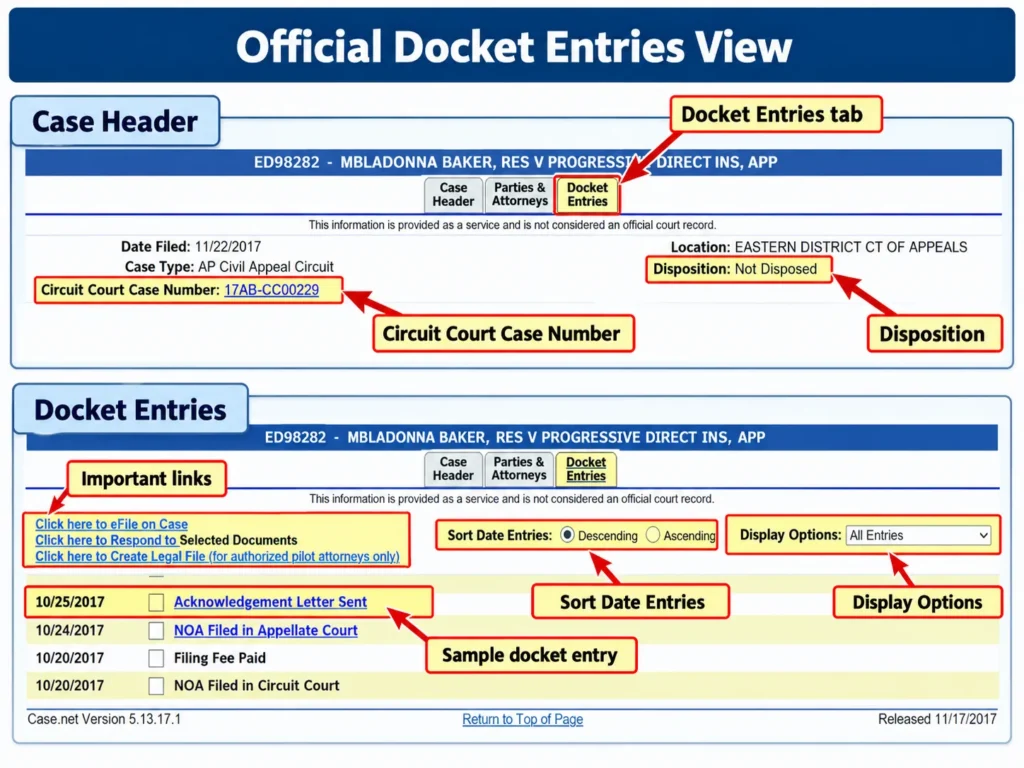
If the website won’t load, see what to do when Case.net is down.
Other Tabs Worth Checking
| Tab | What you’ll find there |
|---|---|
| Scheduled Hearings & Trials | Your next court date, time, and courtroom |
| Charges, Judgments & Sentences | Each criminal charge, how it ended, and any sentence |
| Service Information | Summons, warrants, and whether papers were served |
| Filings Due | Documents the court is still waiting for |
| Parties & Attorneys | People in the case and their lawyers |
Prosecutors and public defenders don’t appear on the Parties & Attorneys tab, and confidential addresses are never shown.
The Most Important Docket Entries to Watch For
Some entries need action from you. Check for these first.
Warrant and Failure to Appear (FTA)
If someone misses a court date, the docket may show Failure to Appear (FTA), often followed by warrant issued. Case.net has no separate warrant search, so the docket and the Service Information tab are where a warrant shows up.
If you see a warrant entry in your own case, contact the court or a lawyer right away. Our Missouri warrant search guide explains other ways to confirm a warrant. Bond set and bond posted entries show the release amount and whether it was paid.
Continuance (Hearing Moved)
A continuance entry means a hearing was moved to a new date. You may see it shortened to “CONT.” Your old court date no longer counts. Find the new date in the entry or on the Scheduled Hearings & Trials tab.
If a hearing was reset more than once, the latest date is the one that counts. Always go by the date on each entry, not its position on the page.
Judgment and Disposition
A judgment entered entry means the court made a final decision on the claims. Under Missouri Supreme Court Rule 74.01, a judgment must be written, signed by the judge, and labeled a “judgment” or “decree.” The docket entry only records that the judgment exists. The signed document is the judgment itself.
A disposition shows how a case or charge ended:
| Term | What it means |
|---|---|
| Nolle prosequi (nolle pros) | The prosecutor dropped the charge |
| Dismissed without prejudice (DWOP) | The case was dismissed but can be filed again |
| Dismissed with prejudice (DWP) | The case was dismissed and cannot be filed again |
| SIS (Suspended Imposition of Sentence) | Probation with no sentence entered. If probation is completed, there is no conviction |
| SES (Suspended Execution of Sentence) | A sentence was entered but put on hold while the person completes probation |
Motions and Orders
A motion filed entry means one side asked the judge to do something, such as dismiss the case or extend a deadline. An order entered entry means the judge ruled on that request. An order can come in the middle of a case and does not end it.
Filing and Service Entries
These entries appear at the start of a case:
- Petition filed: a civil case has started.
- Judge assigned: a judge or commissioner was assigned to the case.
- Summons issued: the court issued the notice telling the defendant about the case.
- Served: the defendant received the papers.
- Entry of appearance: a lawyer formally joined the case.
How to Read a Docket Entry
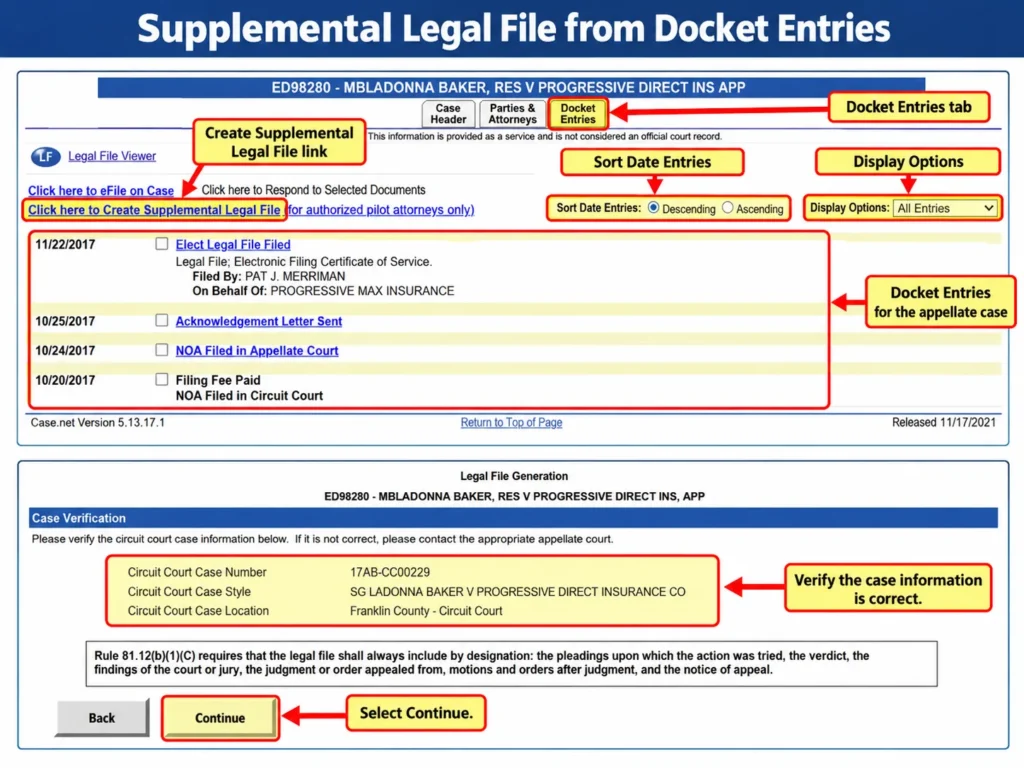
Each entry can include these parts:
| Part | What it tells you |
|---|---|
| Date | When the entry was made |
| Entry description | What happened, such as “Motion Filed” |
| Filed By | Who filed the document |
| On Behalf Of | The party the filing was made for |
| Associated entries | Related entries, such as a motion and the order on it |
| Associated entry text | Extra details, including clerk’s remarks |
| Scheduled events | The date, time, and type of a hearing the entry sets |
Here is a sample entry (the names and dates are made up):
03/14/2026 — Motion for Continuance
Filed By: Jane Doe (attorney)
On Behalf Of: John Smith (defendant)
Associated Entries: 03/20/2026 – Hearing Continued/Rescheduled
This means John Smith’s lawyer asked to move a hearing, and six days later the court moved it.
Don’t skip the clerk’s remarks in the associated entry text. They often hold the new court date or other details the short description leaves out.
Viewing Documents Linked in Docket Entries
A blue link on an entry opens the actual document, such as a petition, motion, or order. You can view, download, or print it.
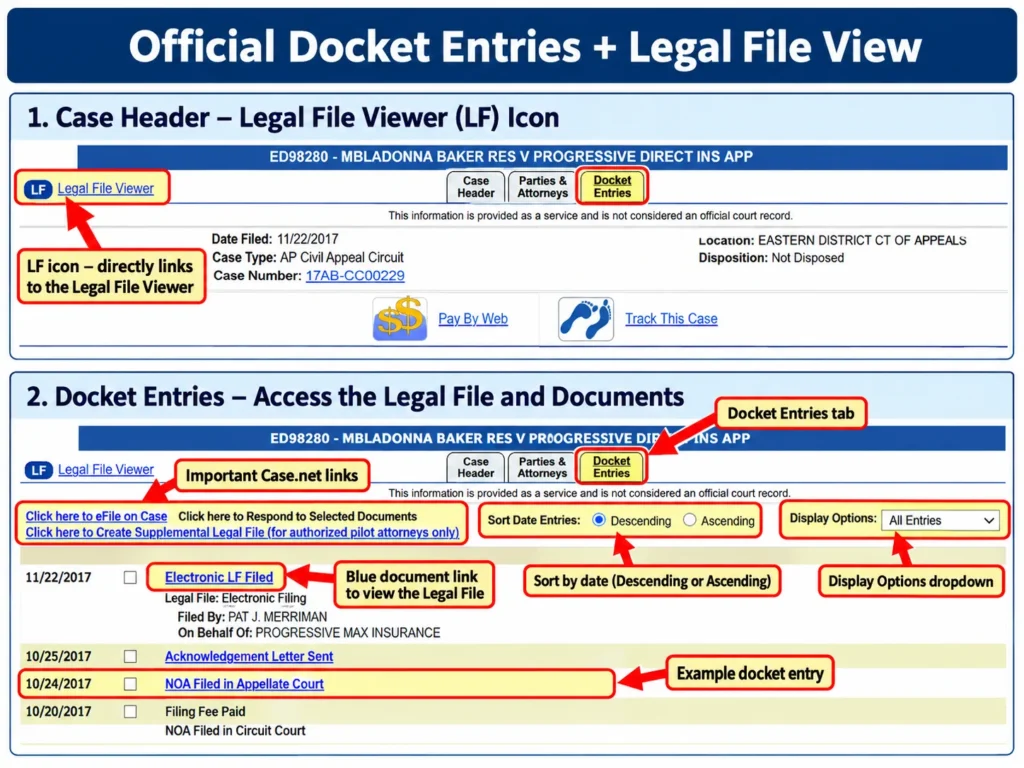
This only works for public documents filed on or after July 1, 2023. Older documents, including some judgments that used to be online, can only be viewed on the public computers at the courthouse where the case was filed.
- No link: the entry may have no document attached, the document may be confidential, or it may have been filed before July 1, 2023.
- Certified copies: for an employer, a license board, or another court, request a certified copy from the Circuit Clerk’s Office. A fee may apply.
Why a Docket Entry Is Missing or Not Updated
The Case Is Confidential, Closed, or Expunged
This is the most common reason a case disappears from Case.net. Under Section 610.105 of the Missouri Revised Statutes:
- If a charge is dropped (nolle prosequi), dismissed, or ends in a not-guilty verdict, the record is closed right away.
- If the case ends in an SIS, the record closes once the case is fully finished.
Juvenile, adoption, court-sealed, and expunged records are also hidden from the public. The defendant in a closed case can still ask the court for access. The clerk’s form for this is the Application to Inspect Closed Criminal Records (Form CR 30).
The Clerk Hasn’t Posted It Yet
A filing appears only after the clerk accepts and dockets it. If it’s still missing after a few business days, call the Circuit Clerk’s Office and ask whether it was received and accepted.
The Case Is Too Old
Each court joined Case.net at a different time. In Clay County, for example, civil and criminal judgments entered before January 1, 1995 are not on Case.net. For older cases, contact the Circuit Clerk’s Office.
The Court Isn’t on Case.net
Some municipal courts keep their own records, so their cases won’t appear. Federal cases are never on Case.net. Search those on PACER.
Still stuck? Search again using “All Participating Courts” and different spellings of the name. For technical problems, contact the OSCA Help Desk at (888) 541-4894.
Get Alerts for New Docket Entries
Track This Case emails you, and texts you if you choose, when a docket entry is added or updated.
- Open the case on Case.net.
- On the Case Header tab, click Track This Case (the blue footprints icon).
- Enter your email address and confirm it through the verification email.
- Optionally, add your mobile number for texts. Texts only start after your email is verified.
- Optionally, turn on reminders for hearings or payment due dates.
What to expect after you sign up:
- Notice timing: notices go out each evening and cover updates made before 5 p.m. that day.
- Fine Collection Center: cases handled there can’t be tracked.
- Confidential cases: if a case becomes confidential, the alerts stop.
Full steps are in our Track This Case guide.
Are Docket Entries Official Court Records?
No. The Missouri Judiciary says Case.net information is provided as a service and is not considered an official court record. When the exact wording or date matters, confirm it with the Circuit Clerk. If you think an entry about your case is wrong, contact the clerk of the court that entered it.
What Is a Docket Entry?
A docket entry is a short, dated note recording one event in a case: a filing, a hearing, or an order. All the entries together form the docket, the full history of the case. An entry is a summary, not the document itself.
Appellate dockets are different. When the Supreme Court of Missouri or the Missouri Court of Appeals uses the word “docket,” it often means a list of cases set for oral argument on a certain day. After argument, a case is “submitted” for a decision. If the court decides it without oral argument, it is “submitted on briefs.”
FAQs About Missouri Docket Entries
How far back do Case.net docket entries go?
It depends on the court and the case type. In Clay County, for example, civil and criminal judgments start in 1995 and probate records start in 1977. For older cases, contact the Circuit Clerk’s Office.
How do I look up criminal charges in Missouri?
Open the case on Case.net and click Charges, Judgments & Sentences. It lists each charge and how it ended.
Are Missouri docket entries public?
Most are. Public civil, criminal, traffic, probate, and family cases are open to anyone. Juvenile, adoption, sealed, and closed criminal cases are not.