
How to Use Case.net Litigant Name Search in Just 5 Minutes
If you need to find a Missouri court case but do not know the case number, Case.net Litigant Name Search is a simple place to start.
Ready to search by name?
MoCaseLookup.com is an independent informational guide and is not affiliated with the Missouri Judiciary.
Quick Answer 🏛️
Open courts.mo.gov/casenet, click Litigant Name Search, choose Person or Organization, and enter the last name. Add the first name or other filters to narrow the list, then click the case number to see the details.
- Required: Last name (person) or business name (organization)
- Optional: First and middle name, alias, case type, filing year
- Where it searches: All participating courts or one court you pick
- Cost: Free, no account needed
It lets you search public case information using the name of a person or organization involved in a Missouri court case.
Missouri Casenet is part of the Missouri Courts system. The same portal also provides Filing Date Search, Case Number Search, Scheduled Hearing Search, Judgment Index, payments, and other case services.
Note: This guide was prepared by Jawad Ahmed, Legal Research Contributor, B.A. in Political Science and legal research contributor. This is not an official Missouri Courts guide and is provided for informational purposes only.
Below is the complete process for using Missouri Case.net Litigant Name Search in under five minutes.
Step 1: Open the Official Missouri Case.net Website
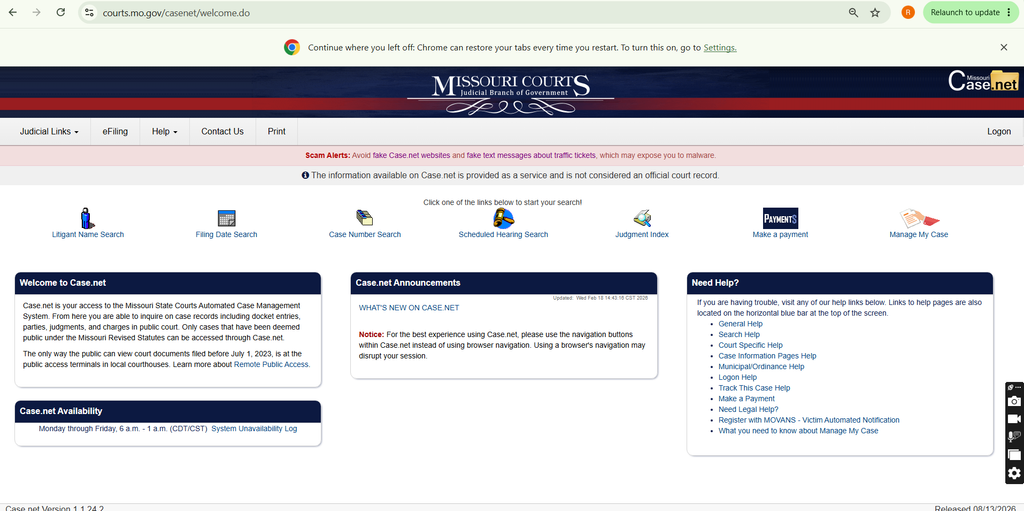
Open your browser and visit the official Missouri Case.net website from Missouri Courts at courts.mo.gov/casenet. If the site doesn’t open for you, read our guide on why Missouri Case.net may not be working.
The Case.net home page gives you several ways to search Missouri public court records.
You will see options such as:
- Litigant Name Search
- Filing Date Search
- Case Number Search
- Scheduled Hearing Search
- Judgment Index
- Make a Payment
- Manage My Case
To search Missouri court records by name, use Litigant Name Search.
Step 2: Click Litigant Name Search
Click Litigant Name Search on the Case.net home page.
Many people call this the MO Case.net name search. It is useful when you know the litigant name but do not know the case number.
A litigant is a person or party involved in a court case, such as a plaintiff or defendant.
Step 3: Select Where You Want to Search for Cases
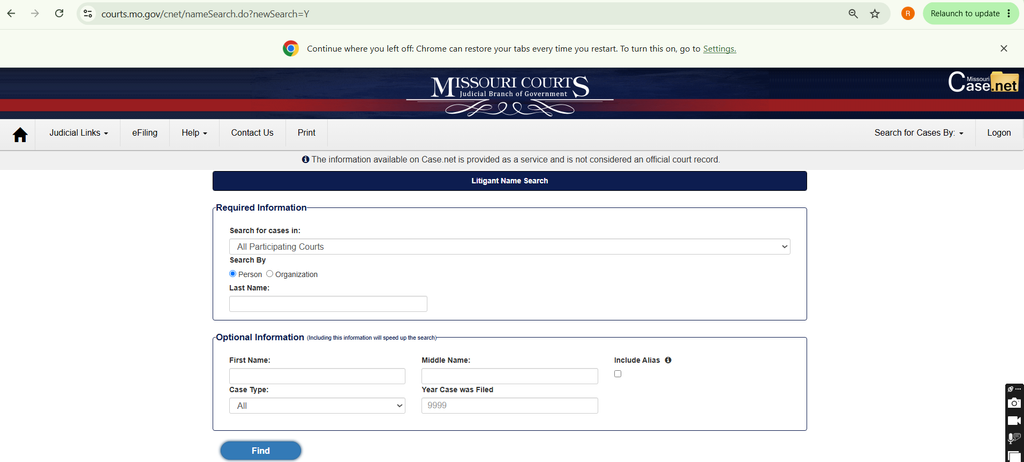
The first field on the search page is Search for cases in.
In the current screen, All Participating Courts is selected by default.
Search All Participating Courts
Keep All Participating Courts selected if you want to run a broad Missouri court case search.
If you know the specific court, you can use the available options in the same field to narrow your search.
Step 4: Choose Person or Organization
Under Search By, Case.net gives you two options:
- Person
- Organization
Choose the option that matches the litigant you want to find.
Search for a Person
Select Person when searching for an individual.
This can include a plaintiff, defendant, or another person listed as a litigant in the court case.
Search for an Organization
Select Organization when you want to search for a business, company, or other organization involved in a case.
Use the correct organization name to get more relevant Case.net search results.
Step 5: Enter the Required Name Information
For a person search, Last Name appears under the Required Information section.
Enter the litigant’s last name exactly as you know it.
Enter the Last Name
Last Name is the main required name field shown on the current Case.net person search form.
Check the spelling before clicking Find.
Add First and Middle Name
First Name and Middle Name appear under Optional Information.
Add them when the last name is common or when your Missouri litigant search returns too many results.
Step 6: Add Optional Search Details
Case.net also provides optional fields to make the search more specific.
You do not need to complete every field.
Include Alias
Select Include Alias if the person may have another name recorded in Case.net.
This can help find additional records connected to the litigant.
Select the Case Type
The Case Type field is set to All by default in the screenshot.
Keep All selected if you do not know the case type, or choose a specific option when you want to narrow the court case search.
Enter the Year the Case Was Filed
Use Year Case was Filed if you know when the case was opened.
A filing year can make it easier to find the correct case when the same litigant name appears in several records.
Step 7: Click Find and Review the Search Results
After entering the available information, click the Find button.
Case.net will search for matching records based on the litigant name and any optional information you entered.
Select the Correct Case Number
Review the results and select the case number that matches the person or organization you are looking for.
Opening the case number takes you to the available court case information.
Review the Case Details
Available public case information can include parties, case status, docket entries, hearings, court dates, charges, and judgments. If a docket entry shows a warrant, our Missouri warrant search guide explains how to confirm whether it is still active.
The information you can view depends on the case and its public access level.
Track This Case
After opening a case, you may also see the Track This Case option.
This feature can provide notifications about case activity, scheduled events, and future payments using an email address and optional mobile phone number.
FAQs About Case.net Litigant Name Search
Can I search Case.net using only a last name?
Yes. You can do a last name search on Case.net. On the current person search form, Last Name appears under Required Information. First Name, Middle Name, Case Type, filing year, and Include Alias are optional fields.
Can I search Case.net without a case number?
Yes. Use Litigant Name Search when you know the person’s or organization’s name but do not know the case number. Case Number Search is available separately when you already have the court case number.
How do I find a Missouri case number by name?
To look up a case by name, open Litigant Name Search, enter the litigant name, and click Find. Review the matching results and select the correct case number to open the case information.
Can I search for a plaintiff or defendant on Case.net?
Yes. A plaintiff or defendant may appear in Case.net when that person is listed as a litigant in the searchable case information. Use the person’s name to run the Missouri court records search. If the defendant is in jail or prison, our Missouri inmate search guide shows how to find where they are held.
How can I narrow Case.net search results?
Add the First Name, Middle Name, Case Type, filing year, or Include Alias option when relevant. You can also change the Search for cases in selection instead of searching all participating courts.
Can I search for an organization on Case.net?
Yes. Select Organization under Search By instead of Person. This option is useful when the litigant is a company, business, or other organization.
Why can’t I find a case on Case.net?
Check the name spelling and remove optional fields that may be making the search too narrow. Some confidential, sealed, or restricted case information may not be available through public search.
Are sealed or confidential cases shown on Case.net?
Not all court records are available through public online access. Confidential or restricted records may not appear like normal public cases.
Can I view docket entries on Case.net?
Public case information may include docket entries and other court filing details. What you can view depends on the case and the level of public access available.
Can I check court dates and hearings on Case.net?
Yes. Available case information can include hearings and court dates.
Case.net also has a separate Scheduled Hearing Search option on its home page.
Can I get notifications about a Missouri court case?
Case.net includes a Track This Case feature for eligible cases. It can provide email notifications and optional text alerts about case activity.
Is Case.net an official court record?
No. The notice shown on the Case.net website states that the information is provided as a service and is not considered an official court record. For an official or certified court record, use the appropriate Missouri court process.
Conclusion
Missouri Case.net Litigant Name Search helps you find public court case information when you know the litigant name but not the case number. Select the search area, choose Person or Organization, enter the name, add optional details if needed, and click Find to locate the matching Missouri court case.